A Human Computer Interface (HCI),is basically the keys and buttons we press to make actions within a game. For example, I can press W on the keyboard and my character will move forward. HCI's are important because without them, we wouldn't be able to control our character and play the actual game. The HCI's allow us to interact with things in the game and there are many different HCI's that are programmed so that we can do it. Here are some examples.
Clicking a Mouse,
Pressing Keyboard keys,
Moving the analog sticks,
Pressing a button,
Moving a Mouse. etc.
Smartphone
how is the layout of the display different to what we see on a console or pc?
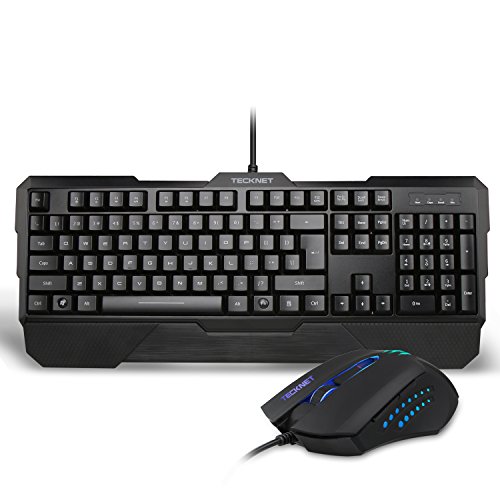
On PC, We would use a mouse and a keyboard to control all over the actions that take place on a keyboard by using the different keys and buttons to select different actions. On the mouse, we have an optical or laser sensor located on the bottom of the mouse, a scroll wheel, a left and right click and sometimes side buttons. These are all programmed to complete different functions so that we can work the computer and do the things that we need or want to do. We also use a keyboard which i mainly used for typing since it has so many keys that have a different letter on the alphabet on each key and there are also some function keys which make some easy functions such as pg up, pg down, num lock, caps lock etc. In games, we can set or use each key to do something different so that we can play the games we play in a comfortable manner.
Compared to a Console, the HCI is quite different but rather similar. The HCI is layed out in a much more simple manner for a console as it only has all the stuff on the controller that you would need in a game since consoles are mainly only for playing games and not multitasking such as browsing the web or sending messages to people like you would on a computer. On a PS4 controller, you would have 4 buttons located on the right of the controller, which are programmed to do different things on each game depending on what the default is set to, a D-Pad located on the left of the controller which can be used to navigate, move around etc. analogs sticks which is the same type of thing but you can move in any direction to gain more precision and it makes in more fluent in moving in diagonal directions. There is also L1, R1 which are the top back buttons on the controller and L2, R2 which are the triggers on the back of the controller. On the controller, there is a start and select button, which are mainly used to bring up the menu, pause screen and scoreboard. There is also the "PS" button which allows you to bring up the home area of the PS3 so you can do other things rather than games such as friends, netflix, music etc. On the controller, you can push each analog stick down which triggers another useful function which can be used in FPS like games to sprint and use a knife conveniently.


This image pretty much sums up what a HCI is. You make an action such as pressing or touching something and then the game reacts and something happens in the game.
Graphic Processors
A Graphics Processing Unit (GPU), is hardware that is used mostly for 3D applications creating lighting effects and transforms objects everytime a 3D scene is redrawn. A GPU would use mathematical equations to process the information in the quickest possible way and the GPU would work with the CPU as the CPU isn't capable of doing everything at once so the GPU can free up the cycles. There are a wide range of different GPU's which can range in performance and price, depending on what the specifcations of the GPU is and the compant that have created as the 2 main ones are AMD and NVIDIA. There are also intergrated GPU's which and built into the CPU but these don't perform as well as they drain the RAM's memory and slow the overall performance of a PC down which wouldn't be good in situtations such as gaming.

Here is an image showing performance of different GPU's whilst playing the game "Rise of the Tomb Raider" in 1080p. They are using FPS (Frames Per Second) to calculate how much better a GPU can perform than the other which is good because the more FPS you get, the smoother the game is going to look and perform, espcially if you have a monitor that has a refresh rate of 144hz or more. The prices of a GPU can rise to very expensive prices which could be bad if you want to play a game with the best performance but there are other options, since you don't actually need the best graphics for every game as some games, you don't even need an expensive graphics card.
Display
The display is the basically the screen we use to present the video game we are playing. Displays have changed over the generation of video games as they proceed to become better and better and they have changed a massive amount since the very first video games. We can display games in various ways that can change the way we view the game and how it looks leaning towards quality and colour graphics. For example, We have recently been getting better resolution for pretty much everything in general, including games, TV, movies and much more. Better graphics for a video game can pretty much guarantee a better gaming experience as it can feel more realistic and it just generally makes everything look much nicer.
Monitors can also come with different refresh rates which aren't neccessarily important for gaming but it makes pretty much everything look so much nicer as everything is much smoother and looks nicer, especially in gameplay. However monitors that do have refresh rates of 144hz and above are pretty expensive just for a display as they start at about £200. Also for these monitors, if you want to see up to 144hz, you have to use a DVI dual link input as a HDMI cable can only display up to 60hz.
Montiors also have different response times as the monitor in the review below has a repsonse time of 1ms which is extremely good, especially for gamers who play FPS games such as CS:GO and Call of duty which means that you will see every action as soon as it happens which will give you an advantage over other people who are playing the game as you will be able to see them before they see you.
Resolution is always a good feature in modern day monitors, as nowadays we have much higher resolutions which allows us to see more detail in everything as resolution goes from 1080p, 1440p, 4K and even 5K. Even though you'll probably need better specification to run the game in a higher resoloution, it still makes the game look much more nicer but it will cost a lot of money.
Game Storage Medium
A Game Storage Medium is any technology such as devices and materials where data can be kept and retrieved. The data was stored on devices such as discs or tapes which can be easily removed and inserted into a different device very easily to transfer data. A bad thing about these is that nowadays, discs are fairly outdated and not as fast as using the internet and the cloud to transfer data without having physical copy. Also, another thing that I don't like about these is that they are very fragile and can break quite easily and if they break, they won't work again and all of the data was was stored on it would all be lost.
Storage comes in many different sizes. Whilst I think that 1TB is more than enough space of storage, for others it may not be if you play or have a lot of games stored on your PC since some video games can actually take up a lot of space on your hard drive.
Another good thing about a Game Storage Medium is that they are relately cheap to buy, even very big HDD that can store up to 2TB of software. A Game Storage Medium is very important because that is where you would store all of your games on you're HDD or maybe even your SSD which allows your games to load and run super fast. SSD's are very expensive as they speed up the process of various things on a computer. For example, many people install windows onto an SSD so that the computer and the computers function will perform very fast, whilst function on a HDD are fairly slow.
Memory can also be stored in places such as Memory sticks and CD's/DVD's. These are more portable than a HDD or SSD but they are more like to get lost or break since a CD/DVD is rather thin and can snap and a Memory stick is small and easy to lose. They can carry small amounts of memory on but you can also get fairly large sizes which allow you to carry larger or more stuff on it which would be good for things such as college work which need to be transported to college and home.

As you can see, a HDD uses a disc to store all of the memory on whilst an SSD is a circuit bored manufactured to get the job done much faster, quieter and it's also more energy efficient.
Connectivity
Connectivity in games is a pretty important thing for gamers nowadays. Connectivity can mostly come important in competitive games which require fast reaction but a slow internet could make the gaming experience terrible due to lag and delay in game play which relates to something called 'ping'. The ping is the reaction time of your connection–how fast you get a response after you've sent out a request. A fast ping means a more responsive connection, especially in applications where timing is everything and it is measured in milliseconds.
You can connect to the internet using a Wi Fi connection where a router is involved and the system you are using uses the Wi Fi card inside of it to detect and connect to the internet. However, this can cause delay for things in games or disruptions could be easily caused because the connection is not going right into the computer which could cause lag. However, I think that Wi Fi is perfect for people using other devices such as laptops and mobile phones which are portable and you tend to move around with them more.
I think that using an Ethernet cable is a very good way to connect to the internet and play games mainly for home consoles and PC's as the device is already wired anyway so using an Ethernet cable will not cause any other problems but it will ensure that the internet connection is going straight to the computer straight from the router which means that the connection is more likely to not be disrupted and the connection will be more stable than a Wi Fi connection.
There is also LAN (Local Area Network), which is a group of computers and associated devices that share a common communications line or a wireless link to a server. These are used in places such as office areas or computer rooms as they are more effective for a large number of computers or multiple people using the same network in the same area.

Central Processing Unit
A CPU is pretty much the heart of a computer, as it is the main specification that maintains a system and keeps it running. It carries out instructions for executing a sequence of stored instructions which are combined to create a program. The program will take input from an input device like a keyboard key or controller button and then the action will take place on an output device.
CPU's perform with a GPU to run specific video games. Whilst the CPU does run the whole system and the GPU mainly focuses on the games. There are many different CPU's that come with different clock speeds, cores and prices which will help the system run much better overall and potentially speed up the process of many things.

Here is a graph showing different processors and they are being compared to how well they perform compared to each other. The ones that perform better are most likely going to cost more than the ones that don't perform as well but again, you don't need the best processor to run a game, you can get a mid range CPU and get similar and stable gaming performance that would play the game just fine where you wouldn't have to spend a tonne of money.
A CPU can last for quite a while, depending on how much you play intensive games on your computer and how recent the model of the CPU you are using is. A CPU needs to be renewed every so often as they start to perform slower over time and become more outdated which isn't good as it can cause incidents such as game crashes and manual computer reboots. Also, some CPU's are only compatible with certain motherboards which can cause problems as since you have to find specific CPU's that your motherboard can run or specific motherboards that your CPU can run since some aren't compatible with each other. CPU's can be overclocked to increase better performance and they have a higher clock speed which is good but it can lead to other problems such as overheating since the CPU was not made to run at that speed but it helps games and other things perform much faster and smoother.

Memory
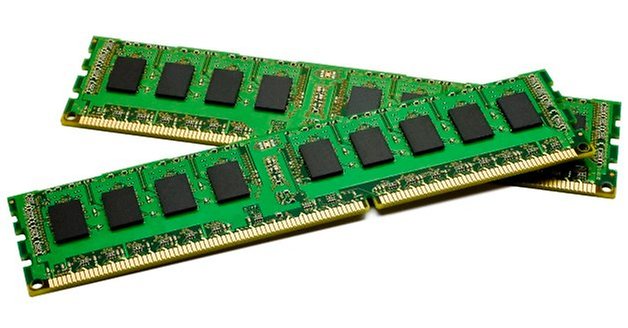
RAM (Random Access Memory) is memory device that is constantly running on the computer as it helps multiple applications/ open data items run at the same time. If a computer or console was turned off, the memory that was in the RAM would be reset and lost meaning that if you was in a game and you didn't save the progress onto the hard drive, then you would have to restart the game all over again from your last save point/ auto save point.
RAM can come in different sizes but the best option of RAM that you should have at least in your PC is about 8GB of RAM. Having this amount is more than enough to maintain all the processes going on in the computer and it should be more than enough to keep your game running at a stable rate. More RAM can help other applications run at the same time whilst playing games, some good examples are applications used to talk to other people which can come in handy in both casual and competitive gaming such as Skype, teamspeak and discord. If you had a low amount of RAM, then having these applications running could effect performance and make the game run slower than it would usually.
.
Sound
Sound can be provided in games many different ways. Of course the sound is what we hear in games such as character voices, movements, environment, sound effects etc. We can use different Output devices that play the sounds for us and the quality of the sound that we hear can be different depending on the device we use. For example, we can use speakers which openly plays the sounds and the volume can be changed by using thing such as dials, button or in the computer/ console. This is good for if you want to listen to the sounds out loud which would be useful if you even was playing a coop game with friends on the same console so that you could a hear and enjoy the game together, you can also get built in sound in a monitor that works in a similar way to speakers since they are practically the same thing but in the monitor. You can also get devices that can change the sound so pretty much only you can hear it, such as earphones, headphones, headsets, which would be good if you are playing games by yourself or online as you don't need anybody else to hear it and it can also help to stop distracting people that are in the house when the game is too loud and other people don't want to hear it. I think that it is also good because all of the sound is directly going into your ears and you can hear everything that is going on easily and even distinct noises such as footsteps and gunfire which can be very useful in competitive games such as CS:GO and Call of Duty. You can also get audio devices that can perform features such as surround sounds which is really cool since it makes the game feel more realistic and amazing. For example, if you was play an FPS and you heard someone shooting or walking, then you would pretty much hear the direction it was coming from and you would be able to track the enemy just by using sound which could help you out in a game a lot. Surround sounds can come in different ways by using speakers in different location or even in headsets nowadays. I own a Logitech G930 which is a wireless headset and it has the ability to switch to 7.1 surround sound which sounds extremely well, helps me in series of games and I think that it just makes me play better and have an overall better experience. Without sound, games wouldn't be the same as I believe that sound effects, ambiance sounds etc. makes a video game much more intense or emotional and it makes the game have a larger meaning.
Sound is produced through a sound card that is located in the system, and they can vary at different prices. The sound card will usually manually come with the PC or Console as pretty much everyone needs sounds unless your death and/or don't listen to anything with sound. There are sound cards that cost a lot of money for really good and HD sound and then there are cheaper sound cards which I think do the job just fine in a modern day computer or console. There are different types of sounds you can experience such as monophonic output, stereo output and surround sound and each one can create a different experience for the player.


Interface Devices
An Interface Device is the device that allows a person to interact with the game. For example, a keyboard is an interface device because you plug it into your PC and then you can press different keys to create different interactions and outcomes. Another interface device is a controller because if you press a button or move an analog stick, then something in the game will probably happen and the controller is plugged in with a wire or wireless. A touch screen is an interface device because you can choose where to tap on the screen to make something happen that wouldn't of happened if you tapped somewhere else on the screen. Interface Devices are important because these are the devices we use to control anything that happens in the game because each device would usually have multiple button or sticks we can use to interact with the game. A problem with interface devices is that wires can get tangled and wireless devices can run out of battery and stop working mid game which could cause you to lose or miss out in some sort of way which wouldn't be good if you was playing a game that was very competitive for example.


In my opinion, I think that the controller is much easily lay out and designed to fit the hand which is perfect for a gaming purpose. All of the buttons are in convenient areas and customisable whilst a keyboard is much more for multitasking purposes are the keys and controls are lay out in a complex way but it makes it much more easy to do multitasking and typing jobs.
Power Supply
A Power Supply is what powers the machine to run by being plugged into the mains and generates the system using electricity. There are many different types of Power Supplies and companies that create Power Supplies, and some Power Supplies can only power up a certain system depending on the wattage that the system needs. For example, If you are building a custom PC and you choose high end range CPU's and GPU's, then it is extremely likely that you will need to have a Power Supply that can power the system with more than enough wattage. Although that things such as consoles that are already built don't really need to be worried about since it's all already done for you and each different gaming device needs a certain amount of wattage to fully function. If you didn't have enough wattage, then the computer wouldn't run or be able to run fast enough and if you don't have a power supply, then the computer will not run at all.

Comparing a Computer Power supply to Portable gaming device such as a Nintendo 3DS. A Computer Power Supply is directly plugged into the mains and is constantly giving the system power at a direct wattage that can be removed in and out of a computer as they can be changed to a different wattage size to suit your computer.
However, A 3DS Power Supply is different because the battery is supplied with power which can last for up to 3-5 hours and it doesn't have to be constantly plugged in as the power supply is a battery which is charged up for a certain period of time and can be used whilst on the go which is very efficient for places that are outside and not in the house. However, this means that the overall system doesn't use as much power so games that need more power probably wont run as well.

No comments:
Post a Comment